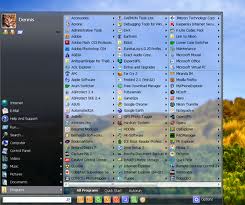
Trick to add Multiple Columns in Start Menu

Start Menu is known to be the Gate Way of the Windows.
This Start Menu is used by many of Computer user to Navigate to any of their Work.
But in this Start Menu there are only limited Columns which are not able to show all of the useful Tasks we need when we use our Computer.

So now here is the Trick to add Multiple Columns in Start Menu.


To use this Trick just follow these simple steps :

1) Click Start  >>  Run  >>  Regedit  >>  press Enter to Open Registry Editor.

2) Now navigate to the key HKEY_LOCAL_MACHINE\Software\Microsoft\Windows\Current Version\Explorer\Advanced.

3) Now Create a String value named as "StartMenuScrollPrograms" ( without quotes ) by Right Clicking in the Right Pane of the window. Now set the value to "FALSE".

4) Now it is done. The Start Menu of the Windows has Multiple Collumns from now.

So it is simple Trick to add Multiple Columns in Start Menu.

Trick to add Multiple Columns in Start Menu

Start Menu is known to be the Gate Way of the Windows.
This Start Menu is used by many of Computer user to Navigate to any of their Work.
But in this Start Menu there are only limited Columns which are not able to show all of the useful Tasks we need when we use our Computer.

So now here is the Trick to add Multiple Columns in Start Menu.


To use this Trick just follow these simple steps :

1) Click Start  >>  Run  >>  Regedit  >>  press Enter to Open Registry Editor.

2) Now navigate to the key HKEY_LOCAL_MACHINE\Software\Microsoft\Windows\Current Version\Explorer\Advanced.

3) Now Create a String value named as "StartMenuScrollPrograms" ( without quotes ) by Right Clicking in the Right Pane of the window. Now set the value to "FALSE".

4) Now it is done. The Start Menu of the Windows has Multiple Collumns from now.

So it is simple Trick to add Multiple Columns in Start Menu.


iBall Slide Android Tablet Specs Price in India

iBall has officially launched its first android tablet named iBall Slide in India with fully loaded entertainment features. The best thing in these tablet is they have placed price tag around Rs. 13,995  according to the our Indian market. On the other side the company had started promotion with  a famous bollywood super star actor Hrithik Roshan as a brand Ambassador.

The new iBall Slide Android Tablet Specifications looking quite impressive and I definitely know that it will get more positive reviews and impressions from android fans in India. First of all the tablet is powered with Google Android 2.3.3 Gingerbread operating system and runs with 1Ghz ARM Cortex A8 single core processor and 512MB RAM enough to handle all multitasking applications and capable to play all high end 3D games without any lag. They have design the tablet with smooth glossy finishing at corners to get the tablet sexy look and at the same time to attract a lot of users to buy the device. It comes with a 7-inch WVGA capacitive multi-touch screen display with a resolution of 800x480 pixels, 2 mega pixel front camera for video calling purposes, 8GB internal memory storage capacity to store all important files and expandable up to 32GB via Micro SD card Slot.
Well the iBall Slide android comes with different connectivity features like Wi-Fi, Two USB 2.0 ports, 3G via Dongle, Bluetooth 3.0, 3.5mm Audio Jack for listening high quality music, HDMI output for connecting Large LCD for playing HD videos.
The best part of iBall Slide android tablet is, they have provided 4400mAh rechargeable battery for longer battery backup and even iBall company manager claims that the tablet can give excellent battery life up to 6.5 hours of music playback time and 5 hours on video playback mode. They have introduced new feature called USB Host and on the go(OTG) Port which helps to copy the data from pen directly. With the help of USB host port you can also connect mouse or keyboard to do your work quickly and you can attach the tablet to PC for enjoying more good user experience.

Advantages
  • Enhanced Android 2.3 Gingerbread OS with nice user interface(GUI).
  • Battery 4400mah gives efficient battery  backup.
  • Supports Adobe Flash support and Plays all HD videos up to 720p

Disadvantages
  • There is no integrated 3G for this tablet, you need to buy seperate dongle means data card to get 3G experience and i know these one makes you really feel bad.
  • More Expensive
  • Looks bulky and not so much thin compared to other tablets in that range
  • No back camera (not confirmed)

My Sincere advice let’s wait for final review of iBall Slide Android Tablet so we get more know about good and bad things. Then after its your choice whether to buy the tablet or not. For more updates of these device Subscribe Here


Trick to make Facebook Account Like Google Plus


The Google Plus introduced the Concept of Circles to Organise the Friend List.

But it is yet to be introduced by Facebook Officially. So what if we want the Circles like Google Plus in Facebook ?


Don't worry there is a Trick to make Facebook Account Like Google Plus through which we can make Circles in Facebook and can organise the Friend List like Google Plus easily.


So to use this Trick just follow these simple steps :


1) Login into your Facebook Account.

2) Now Open a new Browser Window or Tab and
visit this Link ( http://www.circlehack.com ).

3) Now Click on the Login Button and then it will ask to Grant Permissions.

4) Then after Granting Permissions, click on Allow button to see all your Friends in the Upper Half and Circles in the Bottom Half of the Screen.


5) Now it is done i.e Now you can Create New Groups by Clicking on the Create List in the First Circle and after Creating a Group Drag and Drop Friends from the Upper Half of the Screen to Circles just similarly to Google Plus.


So it is simple Trick to make Facebook Account Like Google Plus.

Trick to make Facebook Account Like Google Plus


The Google Plus introduced the Concept of Circles to Organise the Friend List.

But it is yet to be introduced by Facebook Officially. So what if we want the Circles like Google Plus in Facebook ?


Don't worry there is a Trick to make Facebook Account Like Google Plus through which we can make Circles in Facebook and can organise the Friend List like Google Plus easily.


So to use this Trick just follow these simple steps :


1) Login into your Facebook Account.

2) Now Open a new Browser Window or Tab and
visit this Link ( http://www.circlehack.com ).

3) Now Click on the Login Button and then it will ask to Grant Permissions.

4) Then after Granting Permissions, click on Allow button to see all your Friends in the Upper Half and Circles in the Bottom Half of the Screen.


5) Now it is done i.e Now you can Create New Groups by Clicking on the Create List in the First Circle and after Creating a Group Drag and Drop Friends from the Upper Half of the Screen to Circles just similarly to Google Plus.


So it is simple Trick to make Facebook Account Like Google Plus.


Trick to Post Empty Status or Comment on Facebook


We earlier posted a
Trick to Fake Status Update on Facebook.
Now We have come up with a new Trick i.e to Post Empty Status or Comment on Facebook.

Yes this is the Trick as it is not possible to Post an Empty Status or Comment on Facebook. Sonow it everything is possible by
TOP TRICKS AND TIPS.


So to use this Trick just follow these simple steps :


1) Login to your Facebook Account.

2) Now go to Status Update or the Comment field.

3) Now just Press and keep holding Alt key and type 0173 .

4) Now release the Alt Key and Click on Post to Share your Empty Status.

5) Now it is done. Your Empty Status or Comment has been Posted on Facebook.


So it is a simple Trick to Post Empty Status or Comment on Facebook.

Trick to Post Empty Status or Comment on Facebook


We earlier posted a
Trick to Fake Status Update on Facebook.
Now We have come up with a new Trick i.e to Post Empty Status or Comment on Facebook.

Yes this is the Trick as it is not possible to Post an Empty Status or Comment on Facebook. Sonow it everything is possible by
TOP TRICKS AND TIPS.


So to use this Trick just follow these simple steps :


1) Login to your Facebook Account.

2) Now go to Status Update or the Comment field.

3) Now just Press and keep holding Alt key and type 0173 .

4) Now release the Alt Key and Click on Post to Share your Empty Status.

5) Now it is done. Your Empty Status or Comment has been Posted on Facebook.


So it is a simple Trick to Post Empty Status or Comment on Facebook.

.

m