Showing posts with label Google. Show all posts


Google Galaxy Nexus GSM ROM List

g.nexus

*Flash your device at your own risk*

'(08/08/2012) [SS] PARANOIDANDROID 1.9.7a (CM10)(JB)

'(08/07/2012) [SS] Nexium DD3 (4.1.1)

'(08/05/2012) [SS] Black Bean v3.0.6 (JRO03H)

'(08/05/2012) [SS] Team Horizon XenonHD v6.0 (JRO03H)

'(08/03/2012) [SS] MIUI.us V4 2.8.3 (4.0.4)

'(08/02/2012) [SS] AndroidME v1.6.1 (JRO03C)

'(08/01/2012) [SS] BAMF Paradigm v2.1 (JRO03H)

'(07/31/2012) [SS] ASCENT V3 (4.1.1)

'(07/27/2012) [SS] SuperROM v1.2 (JRO03C)

'(07/26/2012) [SS] MoDaCo Custom ROM Jr5 (JRO03D)

'(07/25/2011) [SS] Android Revolution HD™ 6.0.1 (JRO03C)

'(07/25/2012) [SS] Slim Bean 1.0 (4.1.1)

'(07/21/2012) [SS] AOKP Milesone 6 (IMM76I)

'(07/19/2012) [SS] CyanogenMod V9.0 RC2 (4.0.4)

'(07/19/2012) [SS] Team EOS JellyBean (JRO03H)

'(07/17/2012) [SS] EUROSKANK Jellybro (CM10)

'(07/17/2012) [SS] CyanogenMod V9 Nightly (4.0.4)

'(07/11/2012) [SS] Team Inferno Jelly Bean v3 (4.1.1)

'(07/10/2012) [SS] Stock Rooted JRO03C 4.1.1

'(07/09/2012) [SS] ViciousTeam ROMS Sense 4.0 PREBETA2.3

'(07/01/2012) [SS] Twisted AOSP v3.0.0 Nightly #1 (4.0.4)

'(06/26/2012) [SS] Slim ICS 4.2 (4.0.4)

'(06/20/2012) [SS] MoDaCo Custom ROM Ir14 (IMM76I)

'(06/11/2012) [SS] Trickster ROM 1.2.1 (IMM76I)

'(06/09/2012) [SS] Bugless Beast (Nightlies)(4.0.4)

'(05/18/2012) [SS] LiQUIDSMOOTH-v1.4

'(05/17/2012) [SS] EaglesBlood V2.0 (IMM76I)

'(05/13/2012) [SS] Apex v1.1.3 (IMM76I)

'(05/09/2012) [SS] Gummy 1.2.0 (4.0.4)

'(04/24/2012) [SS] GNexusTimeScape RC1.5 (4.0.3)

'(04/24/2012) [SS] FoxHound 0.6 Black Ed. (IMM76D)

'(04/13/2012) [SS] Codename Android 2.0.0RC (4.0.4)

*All source links are from xda-developers forum*

4.1.1 – JRO03C, JRO03D, JRO03H

4.0.4 – IMM76D, IMM76I

4.0.3 – ICL53F, IML74K, IML41K

4.0.2 – ICL53F

Permalink: http://goo.gl/49hhO


[NEW!] Google Nexus 7 ROM List

nexus7

*Flash your device at your own risk*

'(08/03/2012) [SS] AOKP (4.1.1)

'(08/03/2012) [SS] Kaos Droid v2.1 (JRO03D)

'(08/03/2012) [SS] prerooted STOCK JRO03D

'(07/31/2012) [SS] CM10 kang alpha (4.1.1)

'(07/30/2012) [SS] Glazed JellyBean Version 1.1.2 (4.1.1)

'(07/27/2012) [SS] Liquid Jelly Bean Alpha6

'(07/26/2012) [SS] MCR Jr6 (JRO03D)

'(07/22/2012) [SS] EUROSKANK Jellybro (4.1.1)

*All source links are from xda-developers forum*

4.1.1 – JRO03D

Permalink: http://goo.gl/4KIw2


Tricks to Play with Google


Earlier we have discussed about many Google Tricks, like Google Gravity and Google Sphere and many more, now we have come up with more Google Tricks by which we can Play with the Screen of Search Results by Google.

There is nothing difficult in this Trick i.e. we just have to Search the given Below Words on Google and the Trick would be done.


So just follow up the Trick below :

1) Rotate the Page by 360 degree.
Go to Google.com and just type " do a barrel roll " ( without quotes ), press Enter and see the Result.
The Result for this Trick would be that Google Search Page will rotate by 360 degree and will then become stable after that.
Alternatively use this Link.

2) Tilt the Page.
Go to Google.com and type " tilt " or  " askew " ( without quotes ), press Enter and see the Result.
The Result for this Trick would be that Google Search Page will Tilt by a Small Angle.
Alternatively use this Link

3)  Save the Search Result.
Go to Google.com and type " zerg rush " ( without quotes ), press Enter and see the Result. Now You will notice that Search Results will Start to Disappear, Destroyed by Zerglings. Your mission is to Save the Search Results and Kill the Zerglings using your Clicks, but it's not Easy.
Alternatively use this Link.
By the Way, Zerg Rush is a Popular Online Gaming Term used to describe an Overwhelming Scale of attack carried out by One Player against another in Real Time Strategy ( RTS ) Games.

So these are Tricks to Play with Google.

Tricks to Play with Google


Earlier we have discussed about many Google Tricks, like Google Gravity and Google Sphere and many more, now we have come up with more Google Tricks by which we can Play with the Screen of Search Results by Google.

There is nothing difficult in this Trick i.e. we just have to Search the given Below Words on Google and the Trick would be done.


So just follow up the Trick below :

1) Rotate the Page by 360 degree.
Go to Google.com and just type " do a barrel roll " ( without quotes ), press Enter and see the Result.
The Result for this Trick would be that Google Search Page will rotate by 360 degree and will then become stable after that.
Alternatively use this Link.

2) Tilt the Page.
Go to Google.com and type " tilt " or  " askew " ( without quotes ), press Enter and see the Result.
The Result for this Trick would be that Google Search Page will Tilt by a Small Angle.
Alternatively use this Link

3)  Save the Search Result.
Go to Google.com and type " zerg rush " ( without quotes ), press Enter and see the Result. Now You will notice that Search Results will Start to Disappear, Destroyed by Zerglings. Your mission is to Save the Search Results and Kill the Zerglings using your Clicks, but it's not Easy.
Alternatively use this Link.
By the Way, Zerg Rush is a Popular Online Gaming Term used to describe an Overwhelming Scale of attack carried out by One Player against another in Real Time Strategy ( RTS ) Games.

So these are Tricks to Play with Google.


5 Beautiful Uses of Google Search Box

In this post, I am going to reveal some little known uses of Google search box. These uses can increase your productivity at office and will save your time as well.

What You Know:

Google is a search engine and can find any information for you.  And the results are quite accurate and fast as well. All we need to provide the keyword or text and Google will do the rest.

You May Not Know: 

Google search box is like our brain which can do a variety of things. The search box can be used as a calculator, spellchecker, dictionary and so on.

1. Calculator: The box can used to perform some simple mathematical calculations. For ex.


2. Currency Converter:

The box can be used for currency conversions. For ex: Let’s say we want to convert 50 USD into GBP then we need to use the following syntax.


3. Dictionary Definitions:

You can find the dictionary meaning of a particular word by using the following syntax.


4. Fill in The Blank:

Sometimes you don’t know the exact or complete phrase to be searched. So you can do it by placing an * at the end of the phrase.


5. Spell Checker:

The search box can also be used for checking the spelling of a word. All you need to type the keyword in the box and Google’s built in spell checker will tell you if the spelling is correct or not.


These are the few uses of Google search box that I discovered. There are many other uses of search box, I guess.

All you need to explore and discover!


Google Maps 6.5.0 + world nav apk download

Image


Download the latest release of Google Maps, and never carry a paper map again. Google Maps for Android with Navigation (Beta) has:

* Detailed maps with 3D buildings
* Voice guided turn-by-turn GPS navigation
* Driving, public transit, biking, and walking directions
* Live traffic information to avoid congestion
* Local search and business reviews
* Google Maps Street View
* Indoor maps for select airports, hotels, retail stores, and more

Whether you need directions to your destination, the closest good place for a bite to eat, or just a sense of where you are, Google Maps for Android can help.

V6.5.0 update:

    1. New home screen design for Google Maps Navigation (Beta)
    2. Options to get transit directions for preferred transit mode

You can download the APK here:

To learn more visit Google Maps Mobile page. Enjoy!

Permalink: http://goo.gl/c6bqC


Trick to Search Google without Internet through Mobile


Google is the one of the Top Search Engine on World Wide Web i.e. Internet. We can find the Result for any type of Query by just Typing the Query in Google Search Box and
Pressing " Google Search " or " I am Feeling Lucky ".
So this is the Best Method and a way to find the Result for any type of Query.


But the only problem with getting Results through this way i.e. by  Google  ( or Internet ) is that we need an Internet or GPRS Connection available to us, either on Computer or Mobile.
So to resolve this problem cum Finding Solution for this Problem,
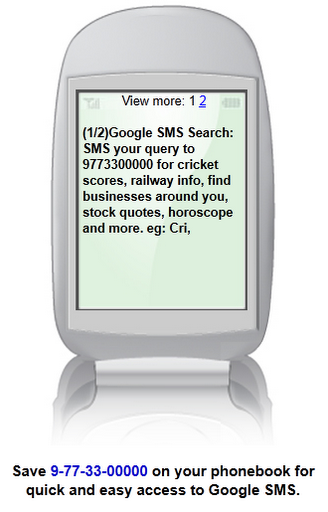
There is a Trick to Search Google without Internet through Mobile.


Now for this Trick we only need a Mobile Phone with Capability of Sending SMS. So to use this Trick just
 SMS " Your Search Query " to 9-77-33-00000

from your Mobile Phone and within few minutes You will Receive the Search Results matching Your Query from Google in Your Inbox.


This service is Free of Cost from Google but You will be Charged ( as per Standard Message Rates of Your Network Operator ) for Sending Messages.

So it is a simple Trick to Search Google without Internet through Mobile.

Trick to Search Google without Internet through Mobile


Google is the one of the Top Search Engine on World Wide Web i.e. Internet. We can find the Result for any type of Query by just Typing the Query in Google Search Box and
Pressing " Google Search " or " I am Feeling Lucky ".
So this is the Best Method and a way to find the Result for any type of Query.


But the only problem with getting Results through this way i.e. by  Google  ( or Internet ) is that we need an Internet or GPRS Connection available to us, either on Computer or Mobile.
So to resolve this problem cum Finding Solution for this Problem,
There is a Trick to Search Google without Internet through Mobile.


Now for this Trick we only need a Mobile Phone with Capability of Sending SMS. So to use this Trick just
 SMS " Your Search Query " to 9-77-33-00000

from your Mobile Phone and within few minutes You will Receive the Search Results matching Your Query from Google in Your Inbox.


This service is Free of Cost from Google but You will be Charged ( as per Standard Message Rates of Your Network Operator ) for Sending Messages.

So it is a simple Trick to Search Google without Internet through Mobile.

.

m